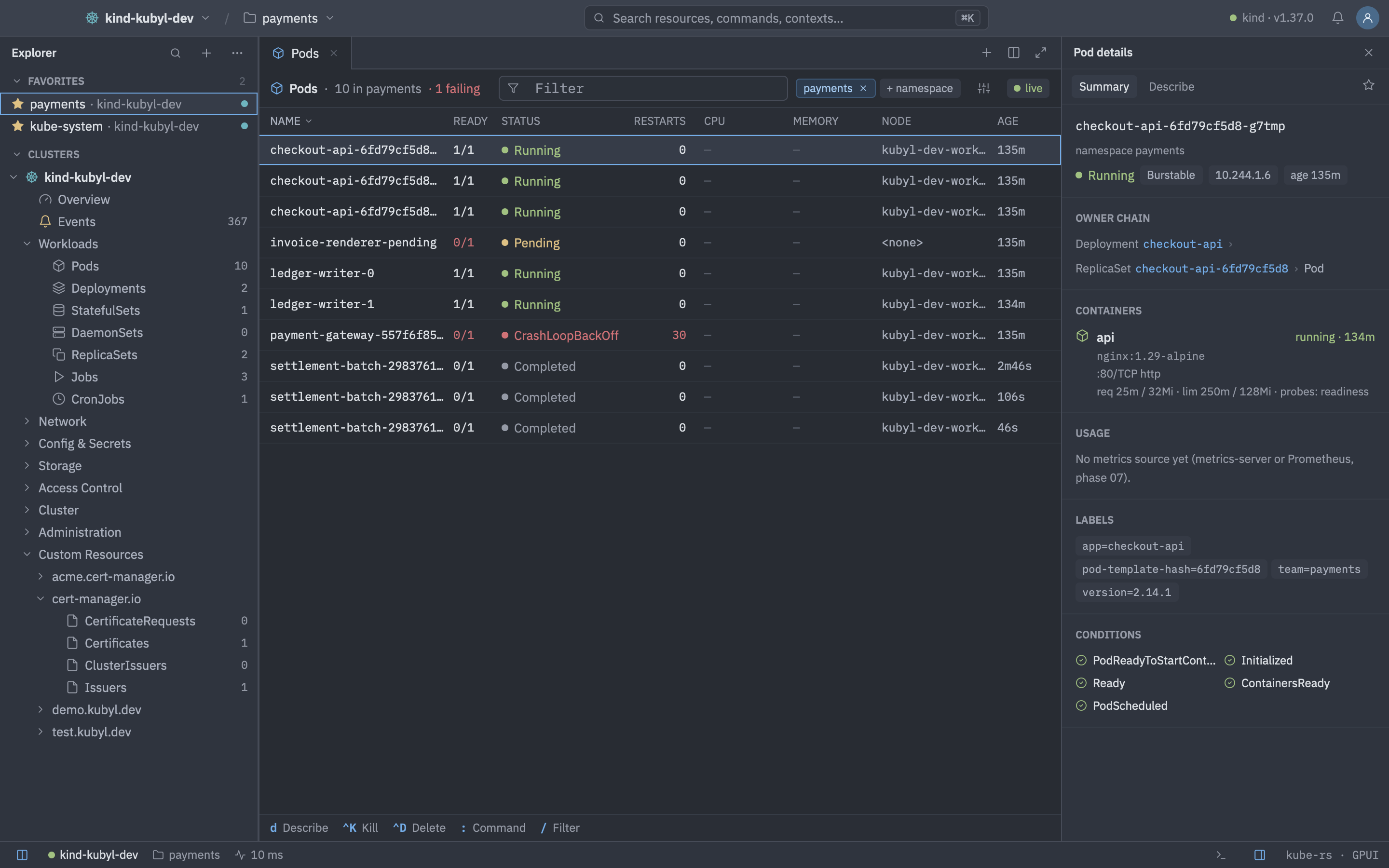
Resource lists are fed by Kubernetes watches and virtualised, so they stay fast with thousands of rows. Columns follow kubectl get and -o wide. Kinds without a built-in column set, such as custom resources, use the server's printer columns.
Supported kinds
| Group | Kinds |
|---|---|
| Workloads | Pods, Deployments, StatefulSets, DaemonSets, ReplicaSets, Jobs, CronJobs |
| Network | Services, Endpoints, Ingresses, Routes (OpenShift), IngressClasses, NetworkPolicies, Gateways, HTTPRoutes, GatewayClasses |
| Config & Secrets | ConfigMaps, Secrets, ResourceQuotas, LimitRanges, HorizontalPodAutoscalers, PodDisruptionBudgets |
| Storage | PersistentVolumeClaims, PersistentVolumes, StorageClasses, VolumeAttachments, CSIDrivers |
| Access Control | ServiceAccounts, Roles, RoleBindings, ClusterRoles, ClusterRoleBindings |
| Cluster | Nodes, Namespaces, CustomResourceDefinitions, APIServices, PriorityClasses, RuntimeClasses, Leases, Mutating and Validating webhooks |
| Administration | Installed Operators and OperatorHub (OLM only), Helm Releases, Cluster Updates, Argo CD (Applications, ApplicationSets, Projects) when the CRDs exist |
| Custom Resources | Everything else the cluster serves, grouped by API group |
Reorder or hide groups with explorer.group_order and explorer.hidden_groups. Counts next to kinds can be turned off with explorer.show_counts.
The toolbar
- Breadcrumb and the filter box.
- A namespace chip. Hold ⌘ or Shift while clicking to select several namespaces.
- A Columns menu with Wide (-o wide). Column visibility is remembered per kind.
- A live-status chip. Click a column header to sort.
Filter syntax
Press / to focus the filter. Terms are separated by spaces or commas and all of them must match.
| Term | Matches |
|---|---|
word | Name or namespace contains the word, case-insensitive. |
!word | Name or namespace does not contain the word. |
/regex/, !/regex/ | Name matches (or does not match) a regular expression. |
app=web, app==web, app!=web | Label equals or does not equal a value. |
env in (prod,stage), env notin (dev) | Label in or not in a set. |
status.phase=Running | Field selector. Keys starting with metadata., spec. or status.. |
/api-/ !canary app=web env in (prod,stage)Moving around
| Keys | Action |
|---|---|
| JorKorUporDown | Move |
| GGorHome | First row |
| ShiftGorEnd | Last row |
| CtrlForPageDown | Page down |
| CtrlBorPageUp | Page up |
| Enter | Open the object |
| ShiftEnter | Show details |
| CtrlEnterorAltEnter | Open in a new tab / in a split |
| Space | Mark a row |
| ShiftUporShiftDown | Extend selection |
| CtrlA | Select all |
| / | Focus the filter |
| CtrlW | Toggle wide columns |
| : | Open resource mode in the palette |
The details panel
Open it with Shift Enter, or keep it docked. It has Summary, Describe, YAML, Logs, Terminal and Files tabs. Describe is kubectl describe-style text. Sections common to every object are status, owner chain, labels, annotations, conditions, related objects and recent events. Kind-specific content includes:
- Pods: containers and ports with one-click forwarding, plus usage sparklines.
- Deployments, StatefulSets, ReplicaSets: +/− scaling. Deployments add the rollout strategy and history.
- Nodes: capacity, taints and addresses. Services: endpoints. PVCs: claim and volume.
- Ingresses and Routes: backends and TLS. The private key is masked with a reveal toggle.
- ConfigMaps and Secrets: data, and a Used by section. Secret values are masked.
- Contributed sections: Metrics, Alerts, Flows, Argo CD and Web views, when the cluster supports them.
Actions
Every action is in the > palette and in the key-hint bar. They apply to the selection, and to all marked rows for bulk actions.
| Keys | Action |
|---|---|
| D | Describe |
| E | Edit YAML |
| CtrlD | Delete… |
| CtrlK | Kill (Pod) |
| ShiftS | Scale… |
| R | Rollout restart |
| U | Rollout undo… |
| P | Pause or resume a Deployment |
| CorShiftC | Cordon / uncordon a Node |
| ShiftD | Drain… a Node, or add a debug container to a Pod |
| TorShiftT | Trigger a CronJob now / suspend or resume it |
| YorShiftY | Copy name / copy YAML (Secret values are masked) |
| L | Logs |
| S | Exec shell (Pod) or node shell (Node) |
| AltS | Shell in an editor tab |
| A | Attach |
| F | Browse files (Pod) |
| ShiftForAltShiftF | Port-forward… / forward the first port |
| W | Open a web view |
Drain behaves like kubectl drain --ignore-daemonsets --delete-emptydir-data, evicts pods and shows progress. Delete has an optional grace period (explorer.default_grace_period). All confirmations are stricter on production clusters.