Kubyl reads alerts from Alertmanager and uses Prometheus rules for pending alerts and rule health. The Alerts row appears in the sidebar when a source is found (alerts.sidebar: auto, always or never).
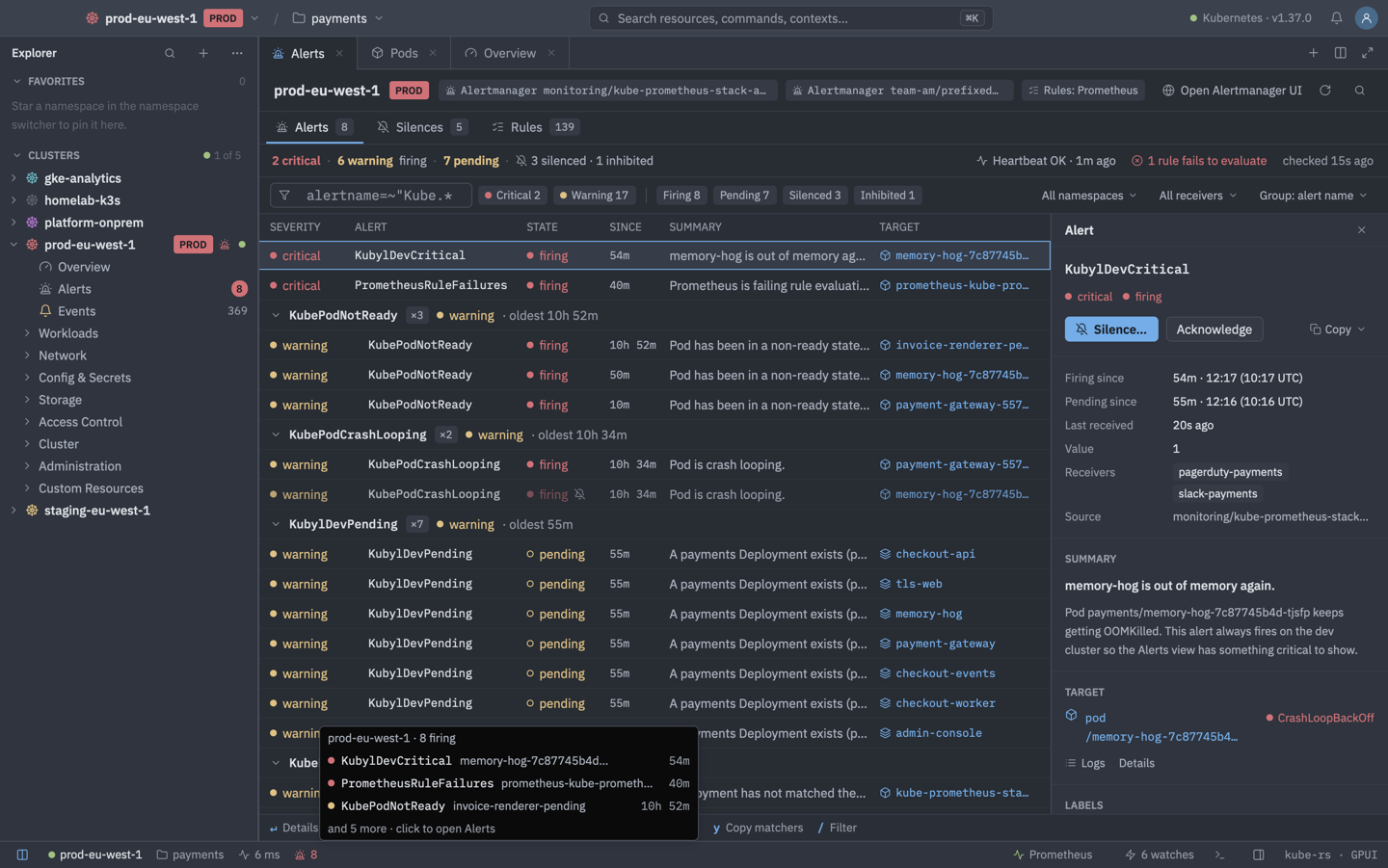
Finding Alertmanager
Discovery is on by default. Alertmanager is reached through the API server's service proxy, an OpenShift Route, a temporary port-forward (trusted Services only) or an external URL. To point Kubyl at a specific instance, set an entry in alerts.clusters.<id>.alertmanagers with namespace, service, port, scheme, path, service_account, tenant (sent as X-Scope-OrgID), url, ca_file, client_certificate, client_key or insecure_skip_tls_verify. An Authorization header for an external URL goes into the keychain via Alerts: Set Alertmanager Authorization Header… (it is not sent when insecure_skip_tls_verify is set).
Basic auth. A Service that answers the probe with a Basic challenge is listed as locked, and Kubyl asks for a username and password. They are sent only over a temporary loopback port-forward to that Service (the API server would strip them from a service-proxy request) and never together with your kube token, so signing in needs get services and create pods/portforward. They are kept in the keychain with the Service's UID, only after the server accepted them, and are deleted when the server rejects them or the Service is re-created. The same works for Prometheus (see Overview and metrics).
Kubyl finds Alertmanager from prometheus-operator objects (Alertmanager resources and a Prometheus' spec.alerting), from Prometheus' own list of Alertmanagers, and by Service names and labels. Services in front of the same pods count once. Alerts: Look for Alertmanager Again re-runs discovery, which also happens after three failed reads.
For a central Alertmanager that serves several clusters, set alerts.clusters.<id>.matchers (for example cluster="prod-eu-1") to select this cluster's alerts. Silences created for it always include them.
Views
- A per-cluster tab with Alerts, Silences and Rules.
- An all-clusters tab: Alerts: Show Alerts in All Clusters. It adds a Cluster column and lists clusters without an alert source at the bottom.
- Sidebar signals: a firing-count badge in the colour of the worst severity (or a check), a red siren marker on the cluster root while something critical fires, and a status-bar siren whose tooltip lists the top three alerts.
- Alerts section: pods, workloads, nodes, namespaces, PVCs, Services and HPAs get an Alerts section in their details, and the cluster and namespace overviews an Alerts card. Alerts: Show Alerts for Selection opens the alerts of a selected object.
Alerts tab
A grouped, filterable table. The header shows the sources found, Open Alertmanager UI (a web view for Services, the browser for Routes and URLs) and a summary line with the heartbeat and rule health. If the heartbeat alert is missing, Kubyl says Prometheus is not delivering alerts or has no Alertmanager configured.
- Filters: a filter box with matchers or free text, severity and state chips (firing, pending, silenced, inhibited) with counts, a namespace menu (including Cluster for alerts without a namespace, and the active namespace) and a receiver menu.
- Grouping by alert name (default), namespace, severity, receiver, target or nothing. Info groups start collapsed.
- Silenced and inhibited alerts are listed after the active ones and marked. Hover to see the silence's comment, author and end. Hide them with the summary's "silenced" count.
- Resolved alerts stay listed below for 15 minutes. Without Alertmanager, Kubyl shows Prometheus' pending and firing alerts, and a "firing since" time marked
~is computed from the rule'sfor.
The details pane shows times (local and UTC), summary, description, the target (checked against the live object, or "not found"), labels, annotations, runbook and generator URL (http and https only, Open in Prometheus opens a web view), routing (silenced by, inhibited by), the rule with its expression, for, health and last error, a link to the defining PrometheusRule, and the last 24 hours ("fired 6 times in 24 h"). Click a label to filter on it and Alt-click to exclude it.
| Keys | Action |
|---|---|
| Enter | Details |
| S | Silence… |
| A | Acknowledge (a silence for alerts.ack_duration, default 1 h) |
| O | Go to the target |
| L | Logs of the target |
| R | Open the runbook |
| Y | Copy labels as matchers |
Silences
The silence editor has a live preview of what it would match, a comment, matchers with completion and a duration. Label and value completion comes from the current alerts, ticked labels can be taken from an alert, and the duration is a preset or a custom end. Your name as creator comes from the cluster (SelfSubjectReview). Every create, edit, acknowledge and extend shows a summary first. Guards: silences are never created on read-only clusters or without an Alertmanager, a comment and at least one non-empty matcher are required, matchers configured for the cluster are always added, and production clusters ask you to type the cluster name when a critical alert matches, more than 10 alerts match or there is no alertname matcher.
The Silences tab lists active and pending silences, with the expired ones of the last 24 hours collapsed, and how many alerts each matches now. An expired silence can be recreated.
| Keys | Action |
|---|---|
| Enter | Edit |
| E | Extend by one hour |
| CtrlD | Expire… |
| N | New silence |
| C | Copy as amtool |
Expiring a silence shows an Undo toast.
Rules tab
Rules by group with state, health, for, evaluation and expression, and the PrometheusRule that defines each group. A filter shows only firing, pending or failing rules. Rules and pending alerts come from the cluster's Prometheus and can be turned off per cluster with alerts.clusters.<id>.rules.
| Keys | Action |
|---|---|
| Enter | Details |
| E | Edit the PrometheusRule |
| A | Show the rule's alerts |
| Y | Copy the expression |
Settings
| Key | Default | Meaning |
|---|---|---|
alerts.enabled | true | Turn the feature off entirely. |
alerts.discover | true | Look for Alertmanager automatically. |
alerts.refresh_interval | 15 s | Refresh while the view is open. |
alerts.background_refresh_interval | 60 s | Refresh for sidebar badges. |
alerts.severity_label | severity | Label that carries severity. |
alerts.severities | none | Map of severity label values to Kubyl's levels, for installs that use other names. |
alerts.clusters.<id> | Per cluster: disabled, discover, alertmanagers, matchers and rules (default true). | |
alerts.heartbeat_alerts | ["Watchdog"] | Alerts treated as heartbeats. |
alerts.hidden_alerts | ["InfoInhibitor"] | Alerts to hide. |
alerts.notify | off | Toast notifications, batched per cluster and minute with a Show button. The first read is only a baseline. Keys: enabled, min_severity (default critical), clusters (active, favorites, production or all) and resolved. |