Under Administration, the Operators view has tabs for Installed Operators, Install Plans, Subscriptions, Helm Releases and Extensions, plus an OperatorHub catalog. The operator rows only appear on clusters running OLM. Helm is shown everywhere and has its own page.
OLM v0
Installed operators are joined from Subscriptions, ClusterServiceVersions (copied CSVs are excluded), InstallPlans and CatalogSources. Their status is Failed, Approval required, Upgrade available, Installing, Deleting or Succeeded. OLM briefly reports ResolutionFailed while it replaces a CSV, and Kubyl keeps the running status and says why. Without OLM the view explains how to install it, and a view-only account sees the 403 message instead of an empty list. You can:
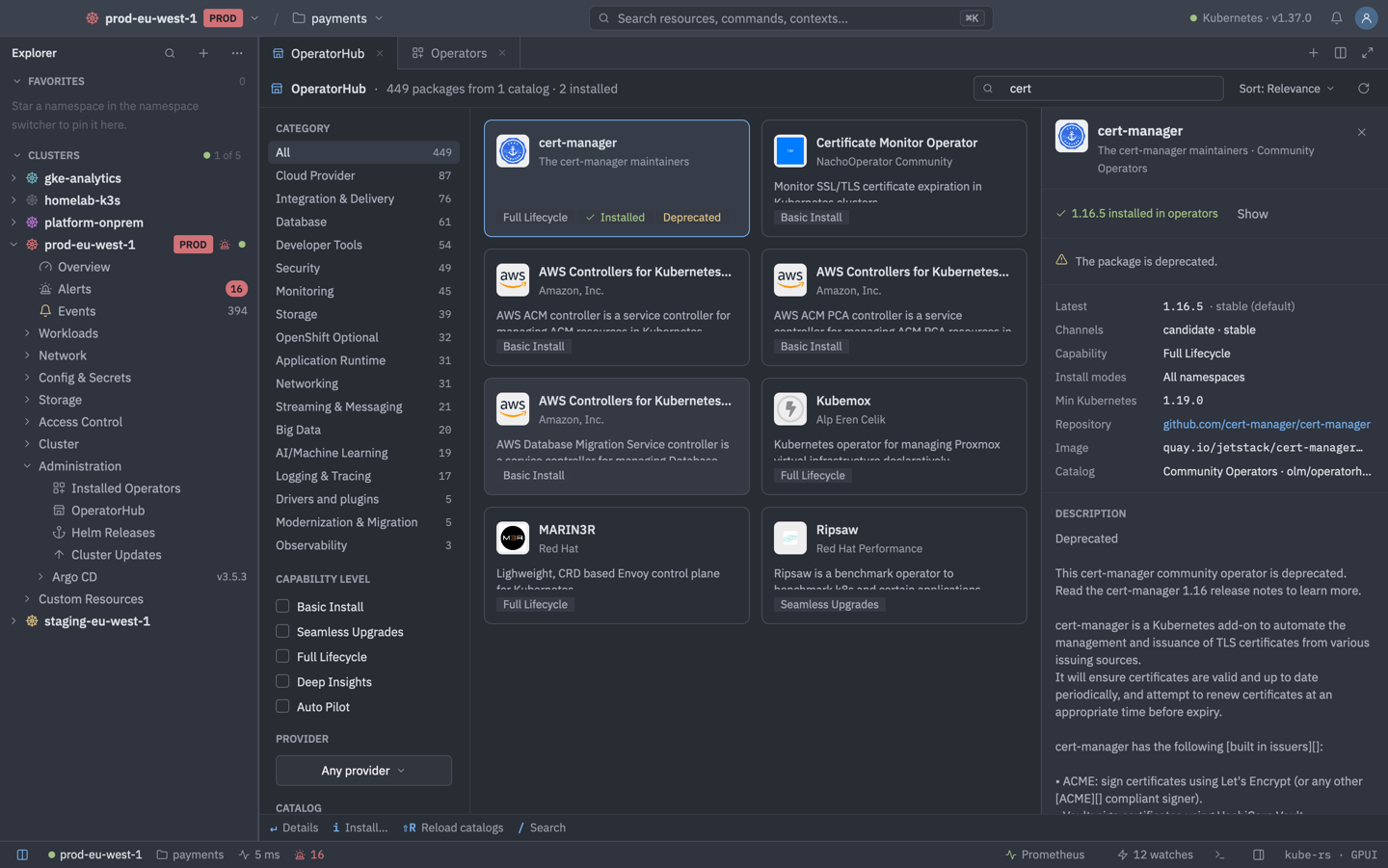
- Install… from OperatorHub, and Reload catalogs.
- Handle manual approval with Approve Upgrade… and Review Changes.
- Create Instance… of an operator's CRD and View CSV YAML.
- Uninstall…, with optional CRD removal that keeps CRDs another CSV owns.
OperatorHub
The catalog lists the PackageManifests of the cluster's CatalogSources with icons, search, sort and category, capability level, provider and catalog filters, and a details pane with a plain-text description. The list is cached per cluster, and Reload catalogs (Shift R) fetches it again. Selecting Install… opens a dialog with the channel, version, install mode, approval strategy (automatic or manual) and a What Kubyl creates summary: the Subscription, and an OperatorGroup when a single-namespace install needs one. Kubyl refuses mismatched install modes, several OperatorGroups in a namespace and a second Subscription for the same package.
Upgrade review
An operator with a manual InstallPlan shows an Upgrade to X card. Review Changes compares the new bundle against what is served: the CRDs that change (as a unified or side-by-side diff, changed ones first), RBAC rules added or removed at cluster and namespace scope, and compatibility with minKubeVersion, the maximum OpenShift and Kubernetes versions and the install modes. A stored version that the new CRD drops is a blocker, like in OLM. Approve Upgrade… applies the plan.
Create Instance… offers the operator's alm-examples in the YAML editor, with a kind picker when there are several. Uninstall… removes instances first (waiting up to 2 minutes), then the Subscription, the CSV and, if you chose it, the CRDs. Writes are hidden on read-only clusters and show a summary first. On PROD clusters Install asks for the cluster name, Approve for the package name, and Uninstall for the operator name (and whenever CRDs and instances go too).
| Keys | Action |
|---|---|
| Enter | Details |
| A | Approve |
| D | Review changes |
| C | Create instance |
| Y | View CSV YAML |
| CtrlD | Uninstall |
| I | Install (OperatorHub) |
| ShiftR | Reload catalogs (OperatorHub) |
OLM v1
ClusterExtensions and ClusterCatalogs are shown read-only. Install and upgrade go through YAML templates (New ClusterExtension…). There is no full UI for v1 yet.
Helm
The Helm Releases tab lists releases and has a Browse charts button. Install, upgrade, roll back and uninstall are described on the Helm page.