When a cluster serves the Argo CD CRDs, an Argo CD group appears under Administration with Applications, ApplicationSets and Projects. Nothing Argo-related is shown otherwise.
Applications
The list shows sync and health, running operation, auto-sync, source, revision, destination (a link when it matches one of your contexts) and last sync. Filter by sync status, health, project and destination.
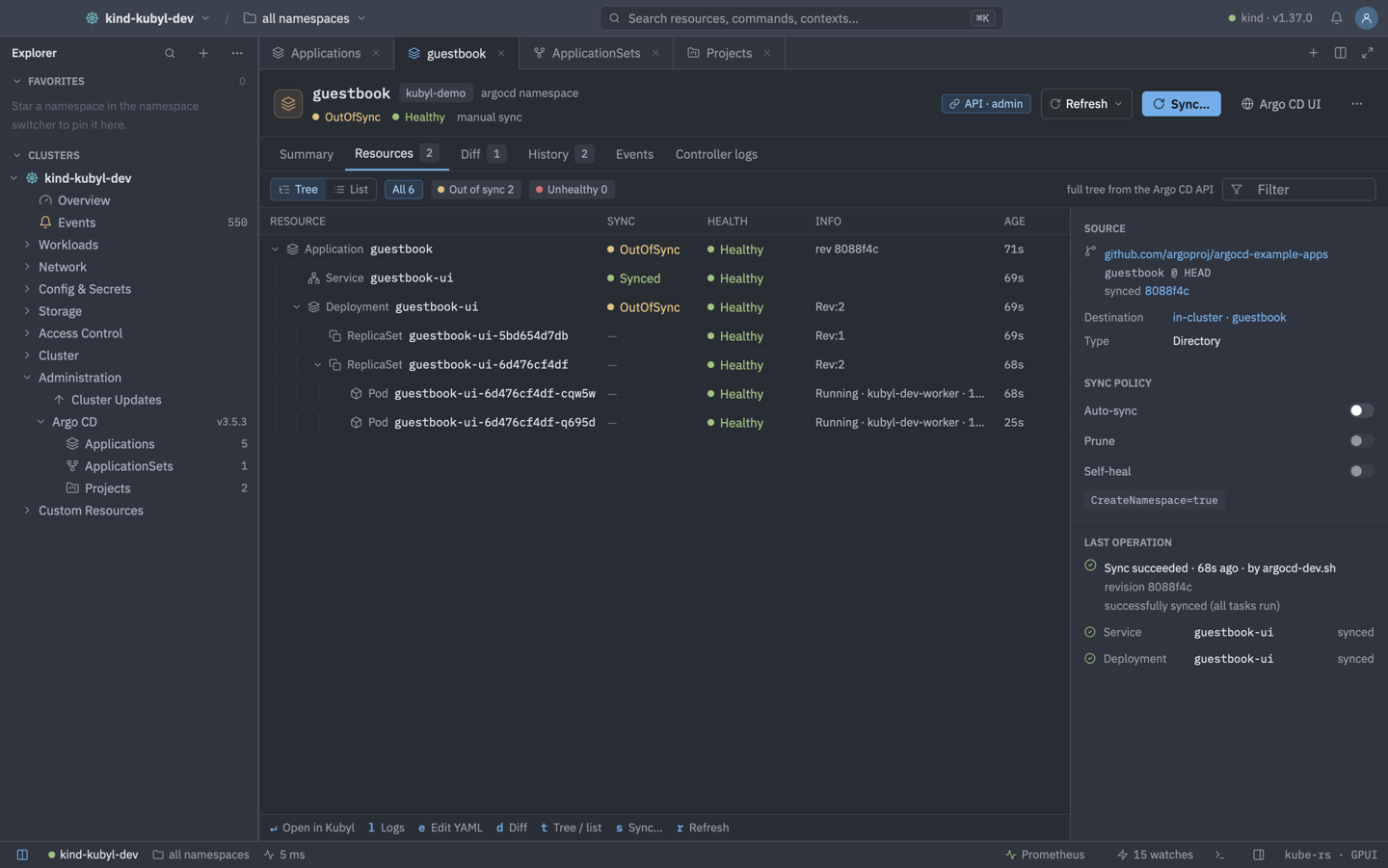
An application tab has Summary, Resources (tree or flat list), Diff, History, Events and Controller logs. A running operation shows its progress, for example "Syncing 12/40". Summary and History link a revision to its commit or compare page for GitHub, GitLab and Bitbucket repositories. The resource tree filters by All, OutOfSync or Unhealthy. Diff shows desired against live state per resource with Secrets masked, and API mode adds Argo CD's rendered diffs. In Kubernetes mode the tree is built from status.resources and Kubyl's live caches through owner references, in API mode from the server's resource tree.
| Keys | Action |
|---|---|
| S | Sync… |
| RorShiftR | Refresh / hard refresh |
| B | Rollback… |
| H | History |
| E | Edit YAML |
| CtrlD | Delete… |
| T | Toggle tree or list (in the application tab) |
| LorEorD | Logs / YAML / diff of the selected node (in the tree) |
Sync… offers Dry run, Apply only, Replace, Server-side apply and Selective sync. Delete… lets you choose cascade and requires typing the name. Terminate Operation and Toggle Auto-Sync (when turning it on) ask for confirmation. Argo CD: Open Argo CD UI opens the native UI in a web view or browser.
ApplicationSets and Projects
ApplicationSets show their generators, sync policy and generated apps. Projects show repos, destinations, allow and deny lists, roles and sync windows, including whether one blocks syncing right now.
Kubernetes mode and API mode
| Kubernetes mode (default) | API mode | |
|---|---|---|
| Talks to | The Kubernetes API, reading the CRDs. | argocd-server. |
| Permissions | Your Kubernetes RBAC. | Argo CD RBAC. |
| Adds | Status and actions by patching Applications. | Rendered diffs, the full resource tree and actions. |
Sign in to API mode with Argo CD: Sign In (API Mode)… using SSO, username and password, or an API token. Kubyl first asks you to confirm the detected install (namespace and Service UID). The token is kept in the OS keychain. argocd.api_transport is auto (default), proxy or forward, and argocd.auto_connect (default on) reconnects automatically.
The mode chip in every Argo CD toolbar shows the current mode and opens sign-in or sign-out. Kubyl never signs in by itself the first time, and never reads Secrets to find an install: detection reads argocd-cm, Services and the controller workload. The sign-in dialog shows the cluster, namespace, Service and port, how Kubyl connects (the API server's service proxy or a temporary port-forward listed in Active Sessions), the version and the url from argocd-cm (shown, never used). With several installs you pick one. Signing in confirms that install per context with its namespace, Service name and Service UID. A re-created Service shows a warning instead of connecting, and auto-connect only reconnects to a confirmed install with a stored token.
- SSO opens your system browser, so passkeys and WebAuthn work, like
argocd login --sso. It uses PKCE and the redirecthttp://localhost:8085/auth/callback, which Argo CD's Dex allows for the CLI client. Kubyl keeps the refresh token in the keychain and renews the session before it expires. - Username and password sign-ins keep the password in the keychain too, to sign in again when the session expires. It is deleted when Argo CD rejects it, on sign-out or when another method replaces it.
- Sign Out revokes the token on the server, then deletes it. Sign Out and Forget This Install also drops the confirmation.
- Argo CD: Open Argo CD UI gives the embedded page your API-mode session as a session-only, HttpOnly cookie for that Service. Without a session, or with web views set to the browser, SSO installs open at Argo CD's own URL in the browser.
- Your Kubernetes credentials never reach Argo CD. Over a port-forward the tunnel is the authenticated API-server connection, so Kubyl does not verify the server's self-signed certificate there.
Safety and guards
- Every action checks your permission first and is blocked on read-only clusters. On PROD clusters, rollbacks and every delete need the typed name.
- Rollback is refused while auto-sync is on. Toggle Auto-Sync edits
spec.syncPolicy(an application usingautomated.enabledgetsenabled: falseinstead of losing the block). - Sync warns when a project sync window blocks syncing right now. It checks that no operation is running, and retries a conflict.
- Delete uses the finalizer that matches your choice: foreground, background or non-cascading, which removes both.
- In API mode, actions run under Argo CD's RBAC and a 403 reads "Argo CD denied this: …". Policy changes always patch the Application, so they need Kubernetes RBAC.
Managed by Argo CD
An object tracked by an Application shows Managed by Argo CD app X in its details, with a link and the drift state. The tracking annotation must name the object itself, and the app.kubernetes.io/instance label only counts when an Application of that name exists. Editing such an object in the YAML editor shows a warning that self-heal may revert it. Argo CD 3 no longer stores per-resource health, so Kubernetes mode computes it from the live objects for Deployment, StatefulSet, DaemonSet, ReplicaSet, Pod, Service, PVC, Ingress, Job, HPA and APIService. Other kinds show no health in Kubernetes mode. The application's Controller logs tab filters the controller's logs to this application. Kubyl was tested against Argo CD 3.4 and 3.5.
Limitations
- SSO for OIDC installs needs a
cliClientIDconfigured in Argo CD. - There is no whole-application rendered-manifest view.
- Custom health checks written in Lua are visible only in API mode.