Press Ctrl K, or : in a list, and start typing. Matching is fuzzy and recently used entries rank higher (the palette remembers the last 50 keys, never secrets). An empty query shows recent entries. Exact aliases rank first.
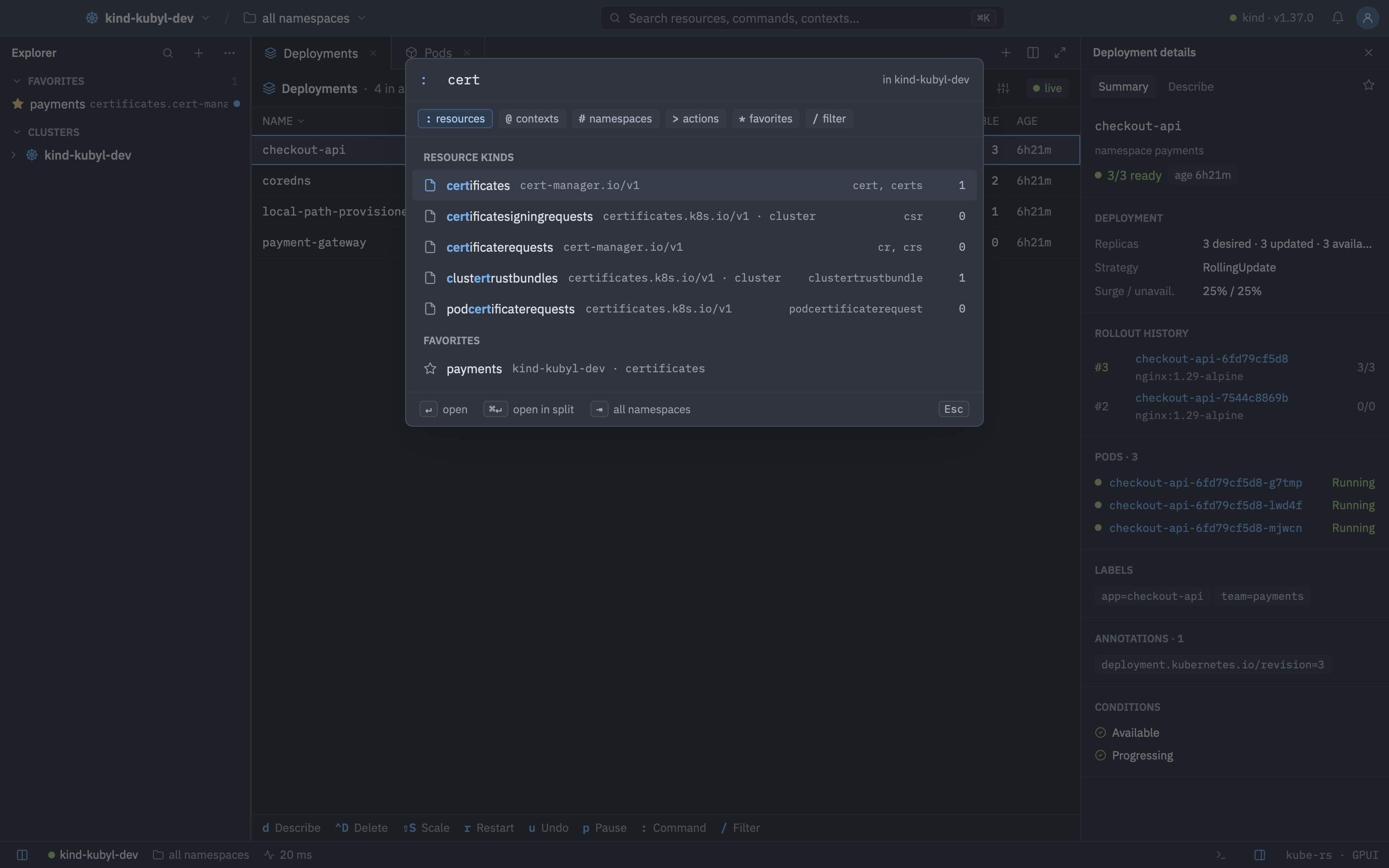
Prefixes
| Prefix | Searches | Example |
|---|---|---|
| none | Everything: kinds, contexts, namespaces, favorites, actions and loaded objects. Objects need at least 2 characters. | nginx |
: | Resource kinds: names, short names, singular names, kind.group and categories such as all, including CRDs, with live counts. | :deploy -A |
@ | Contexts, with connection state and latency. | @staging-eu-west-1 |
# | Namespaces. Open lists follow along. | #kube-system |
> | Actions available where you opened the palette, with their keys. | >restart rollout |
* | Favorites across every cluster. | *payments |
/ | Filter the focused list. | /CrashLoop |
Press Backspace on an empty prefixed query to return to searching everything.
k9s-style commands
After : you can use commands you know from k9s:
| Command | Does |
|---|---|
:pods payments, :po -n kube-system | Open a kind in a namespace. |
:deploy -A, :deploy --all-namespaces, :deploy all | Open a kind across all namespaces. |
:ctx, :ctx <name> | List or switch contexts. |
:ns, :ns <name> | List or switch namespaces. |
:q, :q!, :quit, :qa | Quit Kubyl. |
-A, Tab or a named namespace after a kind also set the active namespace, like in k9s. :xray is recognised but not implemented. Keys shown next to actions follow your keymap, including overrides and the k9s preset.
Favorites
* lists favorites across clusters, offers Add <namespace> to favorites (hidden when it already is one) and Favorites workspace: <kind> for any namespaced kind. The workspace is a list of that kind across all your favorites, which you can include or exclude per favorite from its context menu.
Go to a reference
Shift O in a list offers the objects the selection points at: owners, a pod's node, service account, pull secrets and volumes (Secrets, ConfigMaps, PVCs, projected), env and envFrom references, a selector's pods, a node's pods, a PVC's volume and StorageClass, a PV's claim, an Ingress's Services and TLS Secrets, bindings' roles and subjects, an HPA's target and an Event's object. For unknown kinds it says so.
Related palettes
| Keys | Action |
|---|---|
| CtrlK | Toggle the command palette |
| CtrlShiftP | Actions palette |
| CtrlP | Go to object, across the loaded caches of connected clusters |
| ShiftO | Go to a reference of the selected object (owner, node, secrets…) |
Navigating inside the palette
| Keys | Action |
|---|---|
| UporDownorCtrlNorCtrlP | Move |
| Enter | Open |
| CtrlEnter | Open in a split |
| Tab | Toggle all namespaces |
| Esc | Close |