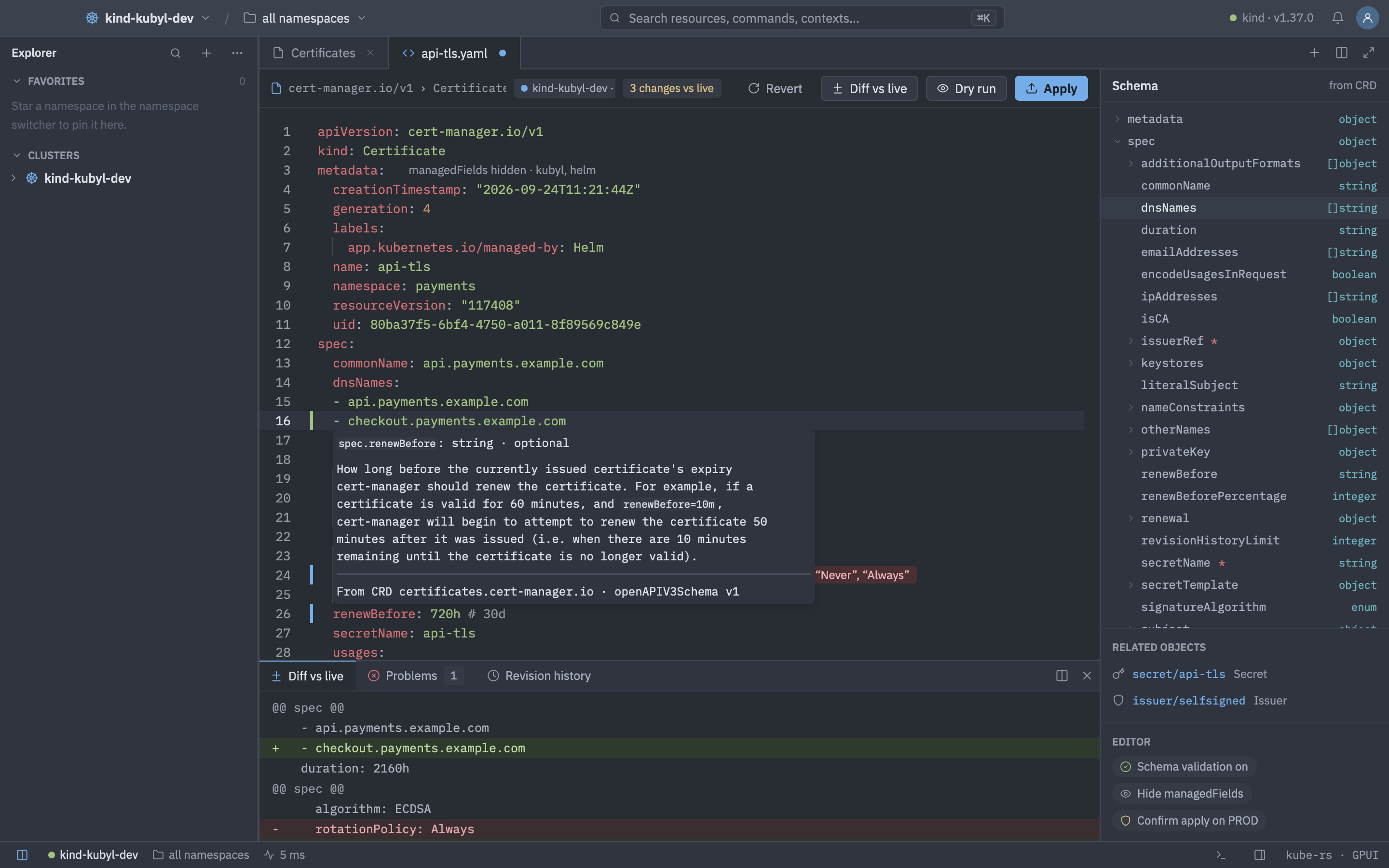
Press E on any object to edit it, or Ctrl N for a new resource. Hover docs, completion and validation come from the cluster's own OpenAPI v3 schema, so custom resources are covered too.
Applying changes
- Apply is server-side with field manager
kubyland strict field validation. - On a conflict (HTTP 409) Kubyl lists the other managers so you can decide to force.
- If the server can't do server-side apply (HTTP 415), Kubyl falls back to replace or create.
- Dry run sends
dryRun=Alland shows the result without changing anything. - Multi-document buffers are supported.
- On a production cluster Kubyl asks before applying (
yaml_editor.confirm_apply_on_prod).
Diff and merge
Diff vs live shows a unified diff, or side by side (yaml_editor.side_by_side_diff), with markers in the gutter. If the object changes on the server while you edit, a banner offers Merge, Reload or Keep mine, using a three-way merge.
Revision history
For objects without a server-side history, Kubyl keeps the last versions you saw, up to 10 per object across 50 objects and 64 KiB per document. Secrets are never recorded. For workloads the history offers Roll back and Load into editor.
Good to know
managedFieldsare hidden by default. A code lens names the managers. Toggle withyaml_editor.hide_managed_fields.- Secret values are masked. Reveal them with the toggle.
- Banners tell you when an object is managed by Argo CD, or when it was deleted on the server (“Apply creates it again”).
- Templates gives starting points for Deployment, Service, Ingress, Route, CronJob, ConfigMap, Secret and PVC.
- Schema validation can be disabled with
yaml_editor.validate. - New resource (Ctrl N) from a list opens a skeleton of that kind with the CRD's required fields. From elsewhere a picker lists the templates and every kind you can create. It is hidden on read-only clusters.
- Problems show as squiggles, end-of-line messages and in the Problems panel, with hover docs (path, type, description). Errors the server returns on apply are placed on their field, and a multi-document apply reports each document on its own.
- A side panel has a schema outline (insert or jump to fields) and related objects. The editor supports search and replace (Ctrl F, Ctrl Shift F) and multiple cursors (Ctrl Alt Up / Down).
statusis dimmed and is never sent. Server-managed fields (resourceVersion,generation) and comment-only edits do not count as changes, and comments survive an apply.- Routes' TLS keys are masked in the editor, diffs and Copy YAML. Warnings also appear for objects managed by Helm or Flux, which revert your edit on the next upgrade or reconcile.
Shortcuts
| Keys | Action |
|---|---|
| CtrlS | Apply (server-side) |
| CtrlShiftS | Dry run |
| CtrlShiftD | Diff vs live |
| CtrlAltD | Toggle side-by-side diff |
| CtrlShiftM | Show problems |
| F8 | Next problem |
| CtrlShiftH | Revision history |
| CtrlJ | Toggle the bottom panel |
| CtrlAltZ | Revert to live |
| CtrlShiftR | Reveal or mask Secret values |
| CtrlAltM | Show or hide managedFields |
| CtrlShiftT | New-resource templates |