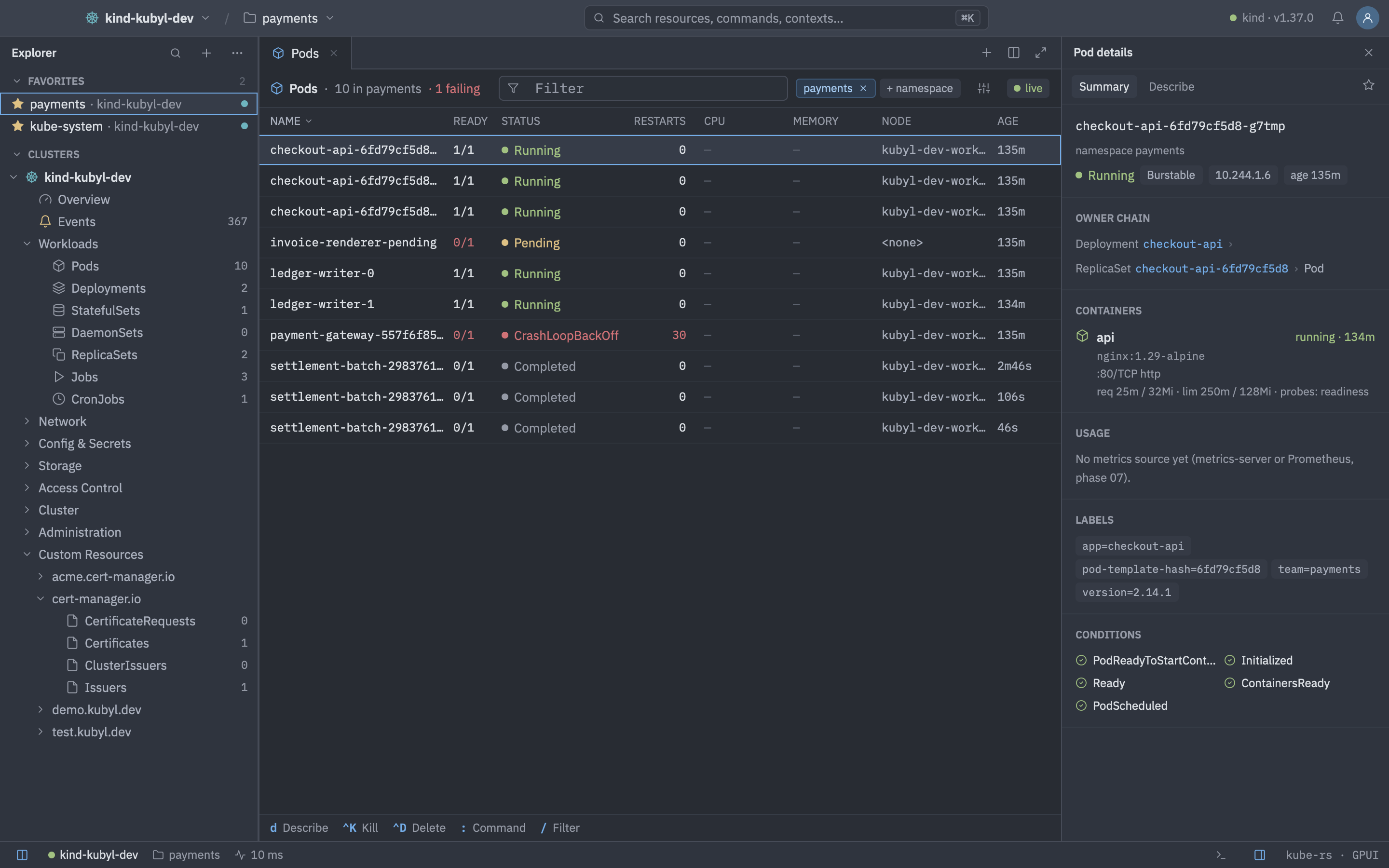
Resource lists are fed by Kubernetes watches and virtualised, so they stay fast with thousands of rows. Columns follow kubectl get and -o wide. Kinds without a built-in column set, such as custom resources, use the server's printer columns.
Supported kinds
| Group | Kinds |
|---|---|
| Workloads | Pods, Deployments, StatefulSets, DaemonSets, ReplicaSets, Jobs, CronJobs, VerticalPodAutoscalers (when the VPA CRDs exist) |
| Network | Services, EndpointSlices, Endpoints, Ingresses, Routes (OpenShift), IngressClasses, NetworkPolicies, and the Gateway API kinds the cluster serves: Gateways, GatewayClasses, HTTPRoutes, GRPCRoutes, TCPRoutes, TLSRoutes, UDPRoutes, ListenerSets, BackendTLSPolicies, ReferenceGrants |
| Config & Secrets | ConfigMaps, Secrets, ResourceQuotas, LimitRanges, HorizontalPodAutoscalers, PodDisruptionBudgets |
| Storage | PersistentVolumeClaims, PersistentVolumes, StorageClasses, VolumeAttachments, CSIDrivers |
| Access Control | ServiceAccounts, Roles, RoleBindings, ClusterRoles, ClusterRoleBindings |
| Device Resources | ResourceClaims, ResourceClaimTemplates, DeviceClasses, ResourceSlices, DeviceTaintRules. Shown only when the cluster serves resource.k8s.io. |
| Cluster | Nodes, Namespaces, CustomResourceDefinitions, APIServices, PriorityClasses, RuntimeClasses, Leases, Mutating and Validating webhooks, Validating and Mutating admission policies with their bindings |
| Administration | Installed Operators and OperatorHub (OLM only), Helm Releases, Cluster Updates, Argo CD (Applications, ApplicationSets, Projects) when the CRDs exist |
| Workloads views | Applications, grouped by app.kubernetes.io/instance (see Applications) |
| Custom Resources | Everything else the cluster serves, grouped by API group |
An entry appears only when the cluster serves its kind. Kinds that now have their own place no longer show under Custom Resources.
Reorder or hide groups with explorer.group_order and explorer.hidden_groups. Counts next to kinds can be turned off with explorer.show_counts.
The toolbar
- Breadcrumb and the filter box.
- A namespace chip. Hold ⌘ or Shift while clicking to select several namespaces.
- A Columns menu with Wide (-o wide). Column visibility is remembered per kind.
- A live-status chip. Click a column header to sort.
Filter syntax
Press / to focus the filter. Terms are separated by spaces or commas and all of them must match.
| Term | Matches |
|---|---|
word | Name or namespace contains the word, case-insensitive. |
!word | Name or namespace does not contain the word. |
/regex/, !/regex/ | Name matches (or does not match) a regular expression. |
app=web, app==web, app!=web | Label equals or does not equal a value. |
env in (prod,stage), env notin (dev) | Label in or not in a set. |
status.phase=Running | Field selector. Keys starting with metadata., spec. or status.. |
/api-/ !canary app=web env in (prod,stage)Moving around
| Keys | Action |
|---|---|
| JorKorUporDown | Move |
| GGorHome | First row |
| ShiftGorEnd | Last row |
| CtrlForPageDown | Page down |
| CtrlBorPageUp | Page up |
| Enter | Open the object |
| ShiftEnter | Show details |
| CtrlEnterorAltEnter | Open in a new tab / in a split |
| Space | Mark a row |
| ShiftUporShiftDown | Extend selection |
| CtrlA | Select all |
| / | Focus the filter |
| CtrlW | Toggle wide columns |
| : | Open resource mode in the palette |
The details panel
Open it with Shift Enter, or keep it docked. It has Summary, Describe, YAML, Logs, Terminal and Files tabs. Describe is kubectl describe-style text. Sections common to every object are status, owner chain, labels, annotations, conditions, related objects and recent events. Kind-specific content includes:
- Pods: containers, a Ports section per container with a one-click Forward (a running forward shows its local address, where a click opens HTTP ports in the browser or copies the address, and a stop button), plus usage sparklines. UDP ports and read-only clusters get no forward button.
- Deployments, StatefulSets, ReplicaSets: − / + next to *ready* scale by one. Quick clicks are merged into one request and shown as "scaling to N" until the object has it. Scaling to 0 asks first (typed on production). The buttons are hidden on read-only clusters and when RBAC denies
patchonscale. Deployments add the rollout strategy and history. - Nodes: capacity, taints and addresses, usage, and a Devices section for device resources. Services: endpoints and ports with a Forward button. PVCs: claim and volume, and the pods that mount the claim, with their status and a link.
- Ingresses and Routes: hosts and URLs with Open in browser, backends with weights and resolved ports, endpoints and pods. Routes add the routers' Admitted conditions, and TLS only shows whether a certificate is present. The private key is masked with a reveal toggle and a copy button.
- ConfigMaps and Secrets: a data block per key and a Used by section (see below). Secret values are masked.
- CronJobs: a job history, newest first, with a live duration for running jobs.
- Contributed sections: Metrics, Alerts, Flows, Argo CD and Web views, when the cluster supports them.
Text in the details panel and the Describe tab is selectable: drag to select, Ctrl A to select the pane you last clicked in and Ctrl C to copy. Double-click selects a word and triple-click a line. A selection stays inside the pane it started in, dragging past the pane's edge scrolls it, and a value that wraps stays on its key's line when copied. The same works in the Alerts, Argo CD, Flows, OperatorHub, Updates and web view panes. Links open on a click, not after a drag. In a table, Ctrl C copies the selected text, otherwise the names of the selected rows. Text inside dialogs can't be selected, so dialog values that matter have a copy button.
ConfigMap data and Used by
A ConfigMap shows one block per key, sorted like kubectl, with binaryData last. The header has the key, a format chip (YAML, JSON, properties, shell, XML or text, from the extension and the content), size, line count, a soft-wrap toggle and a copy button. A block shows its first 20 lines with Show all N lines. It stops at 2,000 lines, and Open in YAML editor shows the rest. YAML values are highlighted. Binary keys show their decoded size and a *binary* chip, copy as base64 and have Save to file…. An immutable ConfigMap gets a chip.
- With more than 8 keys a key filter, Expand all and Collapse all appear.
- Copy all copies the
datamap as YAML or as.env. The.envform takes single-line values only, and the menu says how many keys it skipped. - Used by (ConfigMaps and Secrets) lists the pods that reference the object through volumes, projected volumes,
envkey references andenvFrom, grouped by their Deployment, StatefulSet or other owner, and per key where a reference names one. - Secrets use the same blocks once revealed. Nothing is revealed by default.
Resource views
Some kinds get columns and details sections that connect them to the objects they affect. Names in cells that refer to another object (an EndpointSlice's Service, a binding's policy, a VPA's target) are links.
| Kind | Columns | Details |
|---|---|---|
| ResourceClaim, ResourceClaimTemplate, DeviceClass, ResourceSlice | State (Pending, Allocated, Allocated reserved by N), device classes, device health, driver, pool, node, allocated devices | Requests with their CEL selectors, the allocation and its node, reserved-for pods, devices with attributes, capacity, taints and the claim holding each. A Pod gets a Resource claims section, a Node a Devices section. |
| Validating and Mutating admission policies, bindings | Validations or mutations, failure policy, bindings, policy link, validation actions, param ref | Match constraints, match conditions, variables, validations and audit annotations (CEL in monospace, no syntax highlighting), the bindings and their params. A binding shows its policy and the namespaces it matches. Webhook configurations show match conditions the same way. |
| Gateway, GatewayClass and routes | Class, addresses, programmed, listeners, attached routes, parents, hostnames, backends, accepted | A Gateway lists its listeners with state and attached-route counts and the routes attached. Routes show acceptance per parent and their rules with backends linked to Services. A Service gets a Routes section and an EndpointSlices section. |
| VerticalPodAutoscaler | Target, update mode, recommended CPU and memory | Per container: lower bound, target and upper bound next to the current requests. |
| EndpointSlice | Service, address type, ready/total endpoints, ports | Endpoints with links to their pods. |
| Lease, PriorityClass, RuntimeClass | Holder and renewed, value and preemption, handler and overhead | Describe text. |
Palette short names for :: :claims, :claimtemplates, :deviceclasses, :slices, :vap, :vapb, :map, :mapb, :eps and :vpa. :rc stays ReplicationController. The YAML editor has templates for a ValidatingAdmissionPolicy with a binding and for a ResourceClaimTemplate.
Export a table as CSV
Open the Columns menu and choose Export CSV…, or run List: Export CSV in the palette. Kubyl asks where to save the file and exports what the table shows: the visible columns, in the current sort and filter, including columns filled from related objects. Cells hold the same text as the table.
- The file follows RFC 4180 (CRLF line ends, quoted fields) and has no byte order mark.
- Cells starting with
=,+,-,@, a tab or a carriage return get a leading', so a spreadsheet does not run them as formulas. A negative number becomes'-5. - Secret lists export only the name, namespace, type, number of keys and age. Values are never exported.
- The same export is available in the Applications, Security and Cost views.
Actions
Every action is in the > palette and in the key-hint bar. They apply to the selection, and to all marked rows for bulk actions.
| Keys | Action |
|---|---|
| D | Describe |
| E | Edit YAML |
| CtrlD | Delete… |
| CtrlK | Kill (Pod) |
| ShiftS | Scale… |
| R | Rollout restart |
| U | Rollout undo… |
| P | Pause or resume a Deployment |
| CorShiftC | Cordon / uncordon a Node |
| ShiftD | Drain… a Node, or add a debug container to a Pod |
| TorShiftT | Trigger a CronJob now / suspend or resume it |
| YorShiftY | Copy name / copy YAML (Secret values are masked) |
| L | Logs |
| S | Exec shell (Pod) or node shell (Node) |
| AltS | Shell in an editor tab |
| A | Attach |
| F | Browse files (Pod) |
| ShiftForAltShiftF | Port-forward… / forward the first port |
| W | Open a web view |
Drain behaves like kubectl drain --ignore-daemonsets --delete-emptydir-data, evicts pods and shows progress. Delete has an optional grace period (explorer.default_grace_period). Rollout undo covers Deployments, StatefulSets and DaemonSets and shows a revision picker with the current revision marked. Drain waits for PodDisruptionBudgets, retrying every 5 seconds for up to 10 minutes. When part of a bulk action could not run, Kubyl reports the skipped items. All confirmations are stricter on production clusters: Delete, Scale, Cordon, Uncordon, Drain and Rollout undo ask for a typed name.